Portfolio
VAULTFamily finance for Indian households

Pinch to zoom into any board for detail.

VAULT
UI/UX CASE STUDY

Your family’s money, in one place.

An Android app for Indian households: one shared monthly budget, everyone’s spending side by side, alerts with one-tap fixes, and goals the family saves for together.

Android app Material 3 Fintech 30 screens Design system
Designed by Krithik Ram R K
Add expense screen: ₹640 entered on an in-app keypad, Groceries chosen and a note that ₹860 will be left in Groceries
Family screen: Sharma Household card, a reminder that Kabir hasn’t joined, and who paid what this month
Home dashboard: ₹32,150 left to spend of the November budget, safe-to-spend daily, an alert that two budgets need attention, and spending by category
01 — OVERVIEW

One budget for the whole household, and everyone can see where it went.

VAULT is a family finance app for Indian households. Members log spending as they pay, by UPI, card or cash, and everyone sees the same monthly budget, category limits and savings goals.

I designed 30 screens across six modules: onboarding, home, expenses, budgets, family, and savings with settings, all built from one Material 3 component library.

ROLEUI/UX Designer
PLATFORMAndroid · 393 × 873 dp
FOUNDATIONMaterial Design 3 · Roboto
TOOLSFigma
TIMELINE[Add timeline]
DELIVERABLES30 screens, design system, prototype
One shared budget

₹75,000 split across five categories, with a safe-to-spend number for each day left.

Who paid for what

Every expense has a payer, so the family screen can total each person’s share.

Alerts that fix things

An overspend names what caused it and offers a one-tap fix.

Goals, together

Shared savings goals with contributors and a monthly plan to reach them.

02 — THE PROBLEM

Families share one budget, but their spending is scattered across phones, apps and cash.

25.47B

UPI payments made in India in October 2026, a record month. Money now moves in many small taps, from many phones.

38%

of people in a 2026 Grant Thornton Bharat survey always prepare a monthly budget.

74%

of the same respondents support at least one family member.

In many Indian homes one budget covers parents, a spouse and siblings. The spending is spread across several phones, UPI apps, cards and cash.

Whoever runs the budget often finds out about an overspend only when the month is over.

HOW MIGHT WE

Help a whole household see, share and stay within one monthly budget, without one person doing all the tracking?

Sources: NPCI data for October 2026, via Entrepreneur India; Grant Thornton Bharat, India’s Financial Resilience Report 2026 (528 respondents, mostly young, urban and salaried, surveyed November 2025 to February 2026).

03 — USER PERSONA

Meet Rohan: he runs the household budget, but not everyone’s spending.

Proto-persona · validate with interviews
RS
Rohan Sharma
The household’s money manager
AGE34
LIVES INPune, with 4 family members
WORKIT project manager
PAYSRent, bills, most UPI spends
BUDGETAbout ₹75,000 a month

“I don’t want to police anyone. I just want all of us looking at the same number.”

Rohan lives with his wife, parents and sister. He pays rent and the bills, but groceries, fuel, dinners and gifts are paid by whoever is there, by UPI, card or cash. Each month he pieces it together from bank apps and a family WhatsApp group, and overspends only show up at the end.

GOALS
One budget the whole family can see
Know who paid for what, without asking
Catch an overspend while there’s time to fix it
Save together for a family trip
FRUSTRATIONS
Spending split across five phones and cash
Month-end surprises in one category
Spreadsheets nobody else updates
Worries his parents will find an app too fiddly
HABITS
Pays rent and society maintenance on the 1st
Checks UPI history on Sunday nights
Sorts money questions in a family WhatsApp group
PERSONALITY
Comfort with appsHigh
Love of planningMedium
Patience for manual entryLow
04 — HOUSEHOLD ROLES

One budget, six people, and a role for each of them.

RS
Rohan SharmaSelf
Owner
NEEDSSet the budget and see the whole picture.
DESIGN ANSWERHome, monthly overview and reports · screens 06–10
PS
Priya SharmaSpouse
Admin
NEEDSAdjust limits and plan the bigger goals.
DESIGN ANSWERCreate budget and new savings goal · 17, 26
VS
Vijay SharmaFather
Member
NEEDSLog the electricity bill, and say why it was high.
DESIGN ANSWERComments in the family activity feed · 24
SS
Sunita SharmaMother
Member
NEEDSAdd vegetables in seconds at the market.
DESIGN ANSWERAmount-first keypad and recent categories · 11, 12
AS
Ananya SharmaSister
Member
NEEDSKeep some of her own spends private.
DESIGN ANSWERA Shared with household switch on each expense · 13
KS
Kabir SharmaBrother
Viewer · invited
NEEDSSee the plan without changing it.
DESIGN ANSWERViewer role, SMS invite and permissions · 22, 23
AdminManages budgets, members and every expense in the household.
MemberAdds and edits their own expenses, and sees shared budgets and goals.
ViewerSees shared spending, budgets and goals, but can’t add or change anything.
05 — USER JOURNEY

Rohan’s first month, from sign-up to a shared goal.

01Set up
02Invite family
03Everyday
04Overspend
05Month end
DOING
Signs up with his number, verifies the OTP and sets a ₹75,000 budget.
Invites everyone by SMS and picks a role for each.
The family logs spends as they pay, by UPI, card or cash.
Gets an alert: Transportation is ₹350 over.
Reviews the report and adds to the Goa trip goal.
THINKING
“Will my parents actually use this?”
“Kabir should see it, not edit it.”
“Who paid for that dinner?”
“What pushed it over?”
“We know where it all went.”
FEELING
Hopeful
In control
Relieved
Worried
Proud
PAIN POINT
Yet another app the whole family must install.
Not everyone joins straight away.
Small cash spends get forgotten.
Usually found out only at month end.
Statements scattered across banks.
HOW IT HELPS
Three-step sign-up, SMS auto-read, suggested limits.
Roles in plain words, invite codes and a Remind nudge.
Amount-first keypad, recent categories, Paid by chips.
The alert names the FASTag recharge and offers a fix.
Monthly PDF statements and shared goals.
06 — STRUCTURE AND FLOWS
Five tabs, 30 screens and four flows that tie them together.
INFORMATION ARCHITECTURE
OnboardingWelcome · Sign up · Log in · Verify OTP · Set up household
Home
Monthly overview
Spending breakdown
Recent transactions
Reports
Notifications
Expenses
Add expense
Select category
Expense details
Transactions
Transaction details
Budgets
Budget overview
Create budget
Category details
Budget alerts
Family
Family dashboard
Members
Invite member
Permissions
Activity feed
Goals
Savings goals
New savings goal
Goal progress
From the avatar and bellProfile and preferences · Security and privacy · Notifications
FOUR CORE FLOWS
GET STARTED
Welcome
Sign up
Verify OTP
Set up household
Home
LOG AN EXPENSE
Enter amount
Pick category
Details and payer
Saved
History
Edit
STAY ON BUDGET
Budgets
Create budget
Category details
Over-budget alert
Apply a fix
BRING FAMILY IN
Family
Invite by SMS
Member joins
Set permissions
Activity feed
Each frame in the Figma file lists the frames it links to, and the file includes an interactive prototype of these flows.
07 — VISUAL LANGUAGE

Calm navy for trust, one blue for action, and colour saved for what needs attention.

BRAND AND SURFACES
Navy 900
#0B1F3A
Primary actions, hero cards
Navy 700
#1D3A66
Charts, housing
Accent
#2A5BD7
Links, focus, progress
Accent strong
#1E46B0
Text on tonal fills
Accent soft
#EAF0FD
Tonal containers
Canvas
#F5F6F8
App background
SEMANTIC
Success
#177A4E
On track, saved
Warning
#9B5C00
Near-limit text
Warning strong
#DD8A0B
Near-limit bars
Danger
#C0392B
Over budget, errors
CATEGORIES
Housing#1D3A66
Groceries#2A5BD7
Transportation#12806F
Utilities#6A52C2
Other expenses#5F6C80

Progress turns amber at 85% of a limit and red above 100%.

TYPE · ROBOTO
Tabular figures, Indian grouping: ₹1,85,000
₹32,150Display · 32/40 · Medium
Create your accountHeadline · 24/32 · Medium
Budget alertsTitle large · 20/28
Spending by categoryTitle · 16/24 · Medium
Track household spending together.Body large · 16/24
₹1,500 left for the next 16 days.Body · 14/20
Paid by Sunita · UPIBody small · 12/16
NOVEMBER BUDGETOverline · 11/16 · +8%
8dp grid · radius6 chips8 inputs12 cards16 hero, FAB20 sheetsFull · buttons
CONTRAST CHECK
AaWhite on Navy 90016.5:1Pass
AaAccent links on white5.9:1Pass
AaWarning on warning soft4.8:1Pass
AaInk 3 helper text on white3.7:1Fails AA

The core text pairs pass WCAG AA. Helper text and captions in Ink 3 fall short of 4.5:1; Ink 2 (#4B5568, 7.5:1) fixes them.

08 — COMPONENTS AND STATES

17 component families, each drawn in every state the screens need.

From the VAULT design system file
Buttons

Five types, each with default, pressed, disabled and loading states. 48dp tall with a full-pill shape.
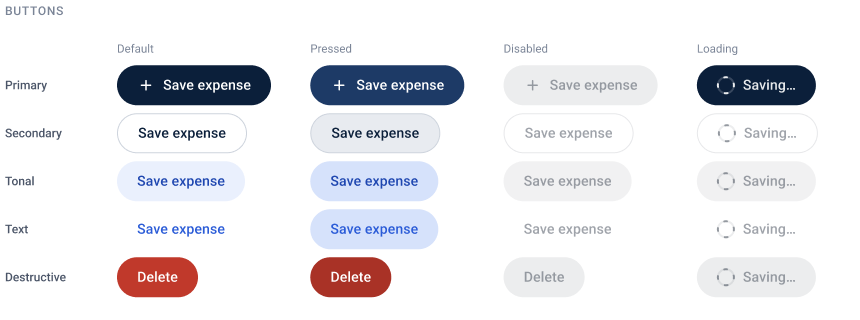
Button matrix: primary, secondary, tonal, text and destructive buttons in default, pressed, disabled and loading states
Inputs

Outlined Material 3 fields with floating labels, helper text and inline errors. Rupees format as you type.
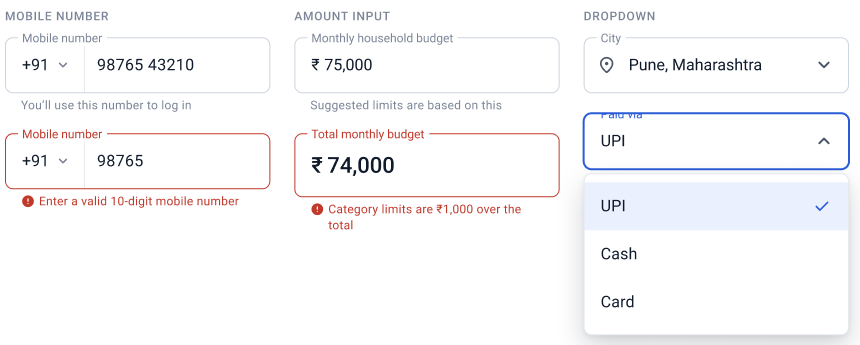
Mobile number, amount and dropdown fields, with error states and an open UPI, Cash, Card menu
Finance components

Transaction rows for default, new, private and selected, and budget bars that turn amber at 85% and red past 100%.
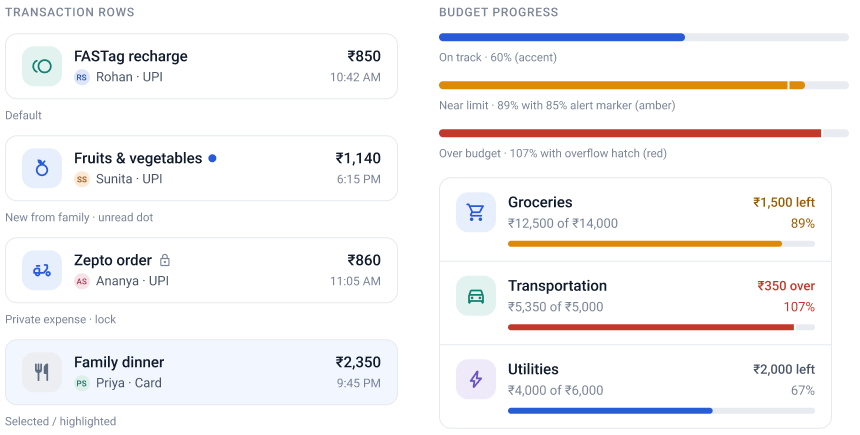
Transaction rows and budget progress bars for groceries, transportation and utilities
Sheets and system moments

A confirmation sheet, a fingerprint prompt, the SMS code notification and snackbars with Undo.
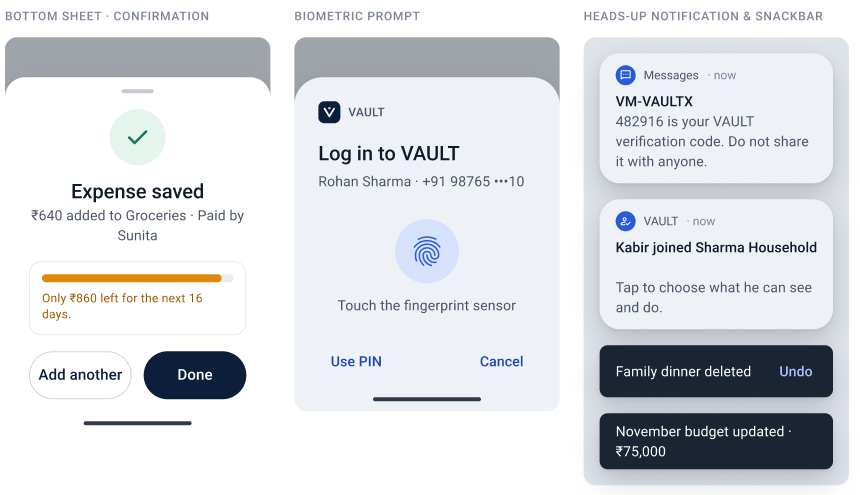
Expense saved bottom sheet, biometric login prompt, heads-up notifications and snackbars
Selection controls

Switches with locked states, checkboxes, radios, a rupee stepper, chips and segmented buttons.
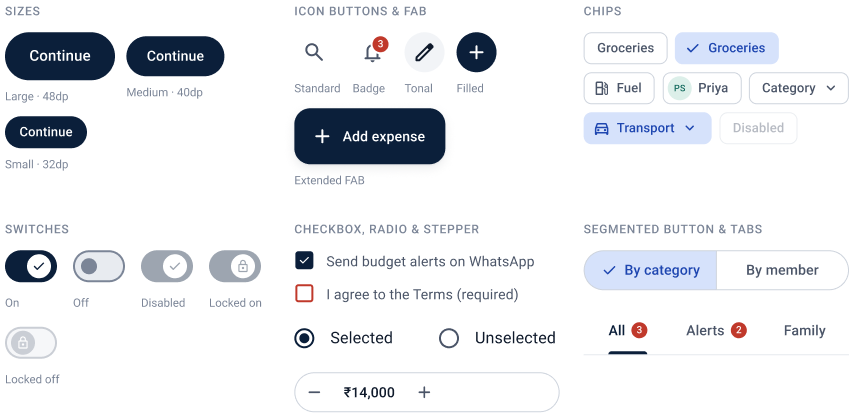
Button sizes, icon buttons and FAB, chips, switches, checkboxes, radio buttons, stepper and segmented tabs
Interaction states

Selected, loading, empty, error, validation, success, permission and budget-warning states, as used across the 30 screens.
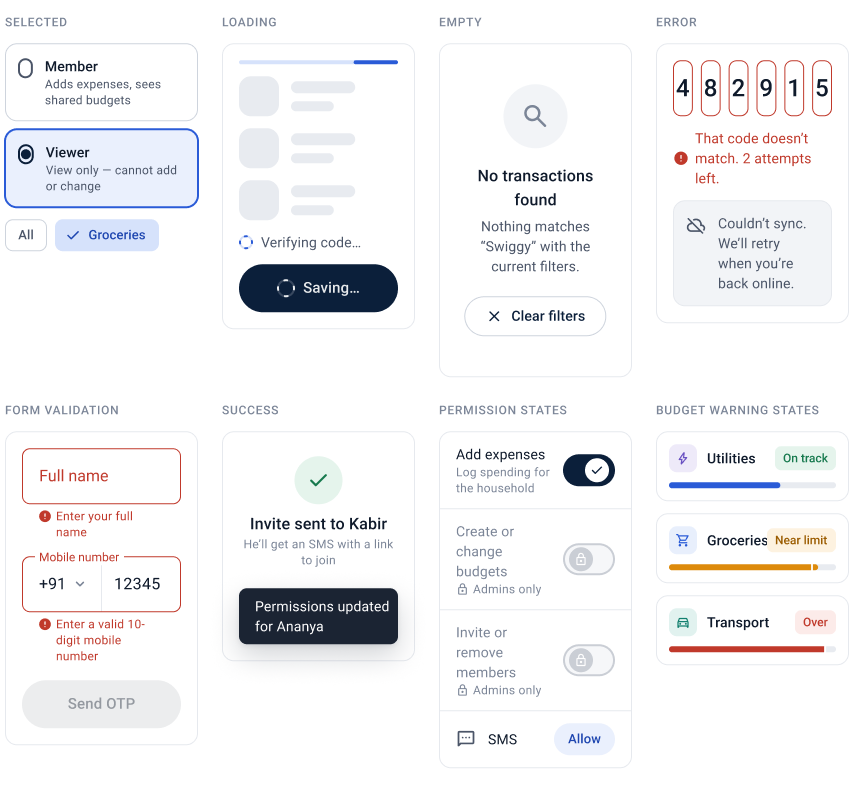
Grid of interaction states: selected role, loading skeleton, empty search, code error, form validation, success, permission toggles and budget warnings
Alert tones

Five tones for inline alerts: information, success, warning, danger and offline.
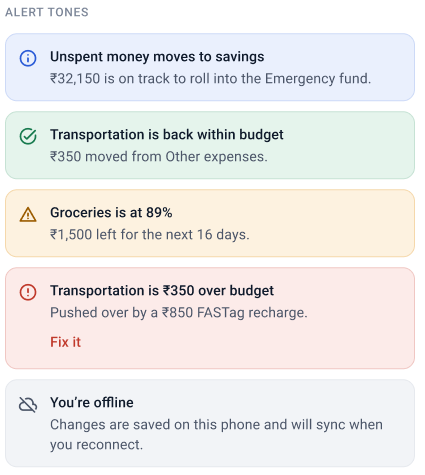
Five alert banners: unspent money to savings, back within budget, groceries at 89%, transportation over budget, and offline
09 — ONBOARDING

From install to a household in three steps, with the SMS code read for you.
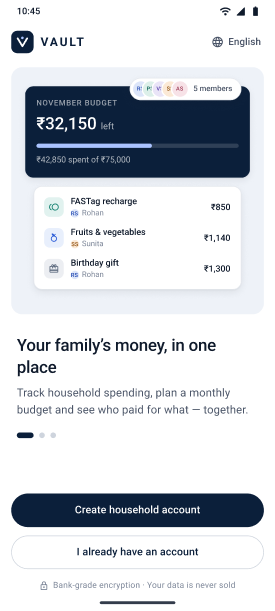
Welcome screen with a preview of the November budget card and family transactions, the line Your family’s money, in one place, and two buttons
1
2
3
01Welcome
1The hero previews the product: a live budget and family spends.
2One promise: your family’s money, in one place.
3Two clear paths, plus a line about encryption.
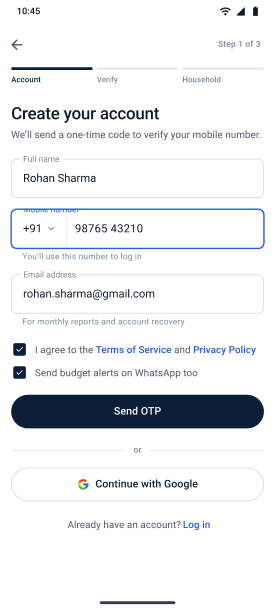
Create your account, step 1 of 3, with name, mobile number, email, two checkboxes and Send OTP
4
5
6
02Sign up
4A three-step bar: Account, Verify, Household.
5Outlined fields with floating labels and helper text.
6Terms and WhatsApp alerts as separate checkboxes.
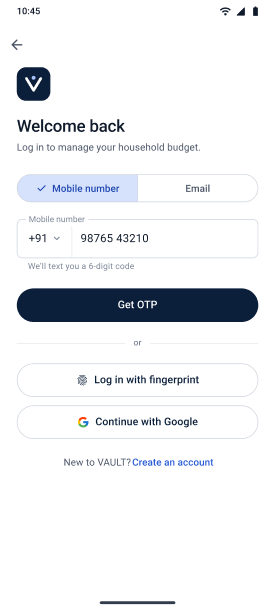
Welcome back screen with a Mobile number and Email toggle, Get OTP, fingerprint and Google options
7
8
03Log in
7Log in by mobile number or email.
8Fingerprint and Google as quick alternatives.
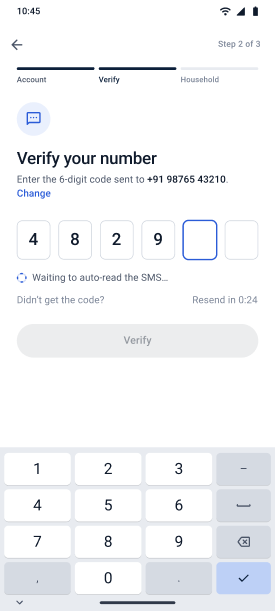
Verify your number: six code boxes with four digits entered, auto-read status, a disabled Verify button and the number pad
9
10
11
04Verify OTP
9Six boxes for the 6-digit code; the active one is outlined.
10The SMS is read automatically; Resend unlocks in 0:24.
11The system number pad, as Android shows it.
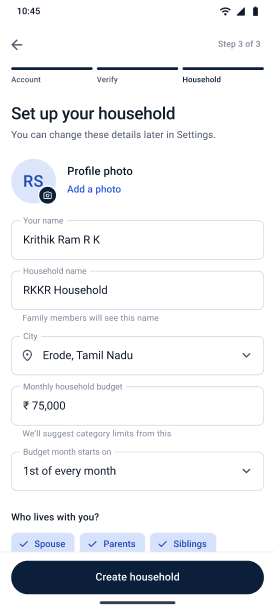
Set up your household, step 3 of 3: profile photo, name, household name, city, monthly budget, budget start day and who lives with you
12
13
14
15
05Set up household
12Initials stand in until a photo is added.
13Household name and city, visible to family.
14The monthly budget seeds suggested category limits.
15Chips for who lives with you.
10 — HOME

One number to watch, and every detail one tap behind it.
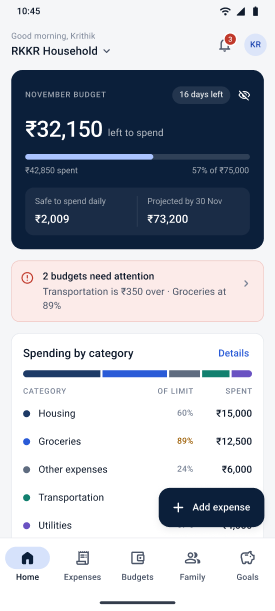
Home dashboard: ₹32,150 left to spend, safe to spend daily ₹2,009, an alert that two budgets need attention, spending by category and an Add expense button
1
2
3
4
06Dashboard
1Left to spend leads, with an eye icon to hide amounts.
2Safe to spend each day, and where the month will land.
3Budgets that need attention, before anything else.
4Add expense floats on every main tab.
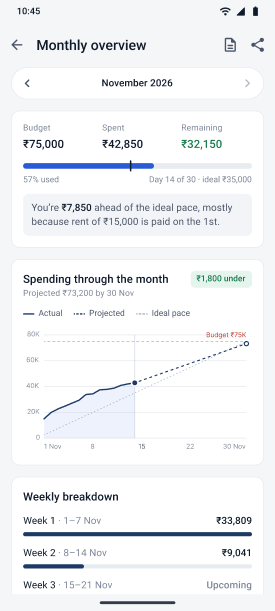
Monthly overview for November 2026: budget, spent and remaining with an ideal-pace marker, a pace explanation, a line chart and a weekly breakdown
5
6
7
07Monthly overview
5Budget, spent and remaining, with a tick for the ideal pace.
6The pace explained in plain words.
7Actual, projected and ideal spending on one chart.
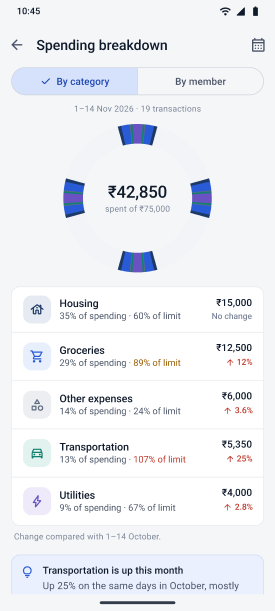
Spending breakdown by category: a donut chart for ₹42,850 and five category rows with change against October
8
9
08Spending breakdown
8Switch between by category and by member.
9Each category shows its share and change since October.
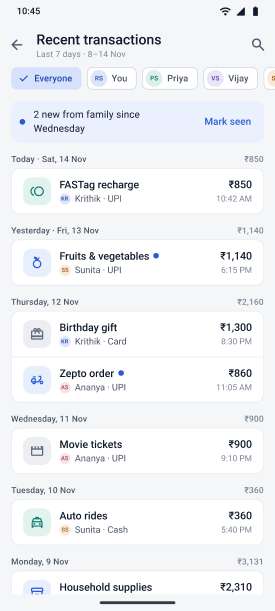
Recent transactions for the last 7 days with member filter chips, a banner for new entries from family and day groups with totals
10
11
09Recent transactions
10Filter by family member.
11New entries from family are flagged until seen.
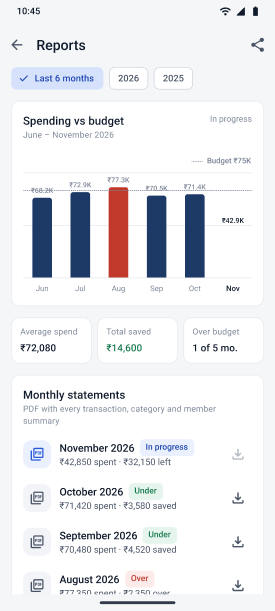
Reports: spending against budget for six months with August over budget in red, summary tiles and downloadable monthly statements
12
13
10Reports
12Six months against the budget line; the over month in red.
13Monthly PDF statements, marked under or over.
11 — EXPENSES

Log a spend in seconds, and say who paid without typing a name.
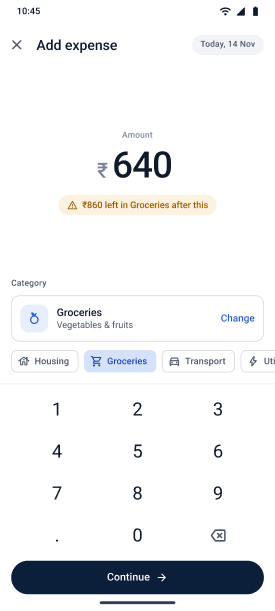
Add expense: ₹640 typed on an in-app keypad, a note that ₹860 will be left in Groceries, the Groceries category and quick category chips
1
2
3
11Add expense
1Amount first, in big type, on an in-app keypad.
2Shows what will be left in the category before saving.
3The likely category is pre-picked, with quick chips.
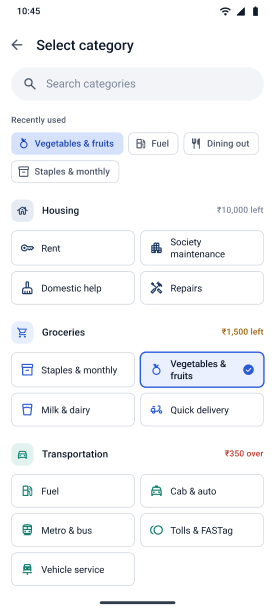
Select category: search, recently used chips and categories grouped by Housing, Groceries and Transportation with amounts left
4
5
12Select category
4Search, plus the categories used most recently.
5Each group shows what’s left, in red when over.
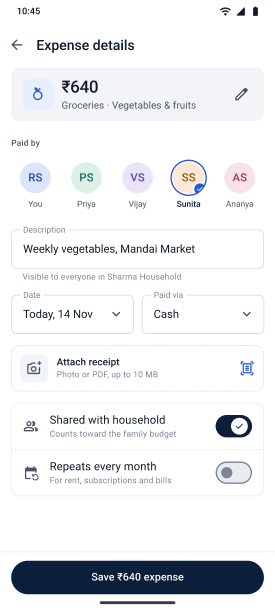
Expense details for ₹640: paid by Sunita, a description, date, paid via cash, attach receipt, and switches for shared with household and repeats every month
6
7
13Expense details
6Who paid, picked from the family avatars.
7Share with the household, or keep it private.
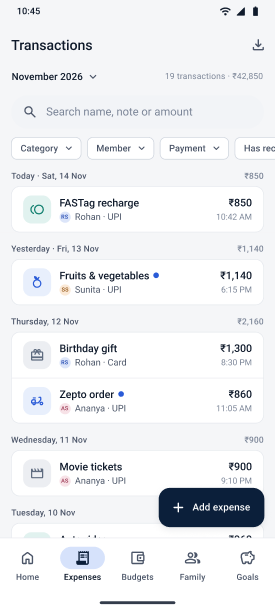
Transactions for November 2026: search, category, member and payment filters, and entries grouped by day with totals
8
9
14Transactions
8Filter by category, member and payment type.
9A dot marks entries new from family.
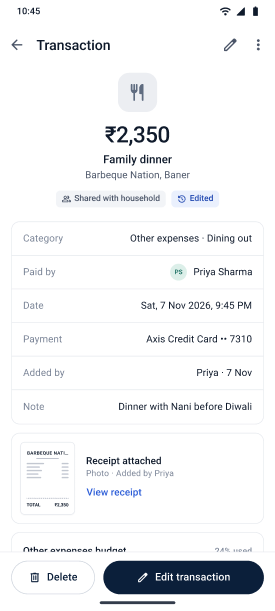
Transaction details for a ₹2,350 family dinner, shared with household and edited, with category, payer, date, card, note and receipt
10
11
12
15Transaction details
10Chips say it’s shared and has been edited.
11Who paid, how, and a note, with the receipt attached.
12Delete and Edit sit together at the bottom.
12 — BUDGETS

Limits that warn early, and overspends you can fix in one tap.
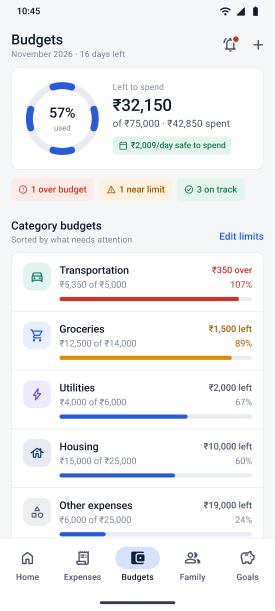
Budgets for November: 57% used ring, ₹32,150 left, status chips for 1 over, 1 near limit and 3 on track, and category budgets sorted by attention
1
2
3
16Budget overview
1Left to spend, with a daily safe-to-spend figure.
2Status chips: over, near limit and on track.
3Categories sorted by what needs attention first.
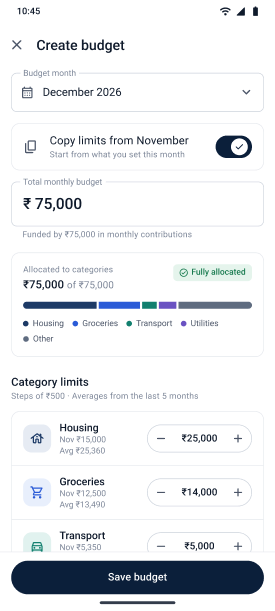
Create budget for December 2026: copy limits from November, total ₹75,000 fully allocated, and category limit steppers with averages
4
5
6
17Create budget
4Copy last month’s limits in one switch.
5A bar shows the total is fully allocated.
6₹500 steppers, with last month and the 5-month average.
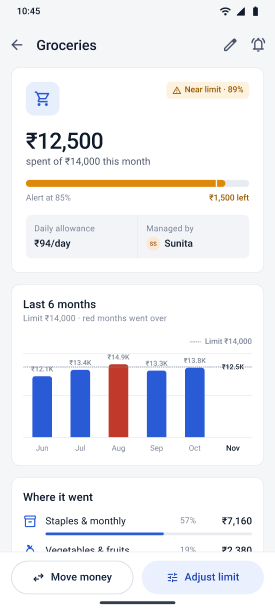
Groceries: ₹12,500 spent of ₹14,000, near limit at 89%, ₹94 a day allowance managed by Sunita, a six-month chart and where it went
7
8
9
18Category details
7Near-limit warning with an 85% alert marker.
8A daily allowance, and who looks after this category.
9Six months against the limit; over months in red.
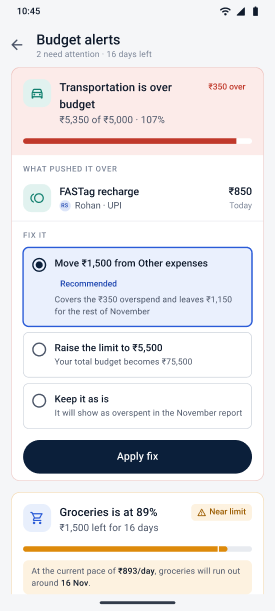
Budget alerts: Transportation ₹350 over, the FASTag recharge that pushed it over, three fix options with Move ₹1,500 from Other expenses recommended, and a groceries pace warning
10
11
12
19Budget alerts
10Names the spend that pushed it over.
11Three fixes, one recommended, applied in one tap.
12Warns when the current pace will run out early.
13 — FAMILY

Everyone in, at the right level of access, with a shared record of what happened.
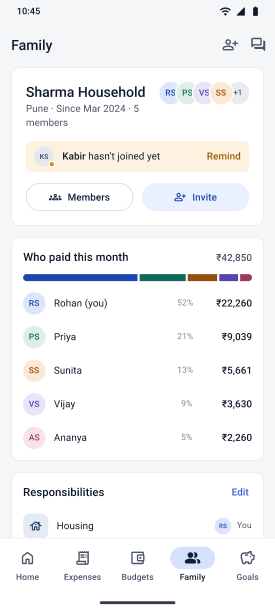
Family: Sharma Household card with member avatars, a reminder that Kabir hasn’t joined, Members and Invite buttons, who paid this month and responsibilities
1
2
3
20Family dashboard
1The household at a glance, with every member’s avatar.
2A nudge when someone hasn’t joined yet.
3Who paid this month, as a bar and a list.
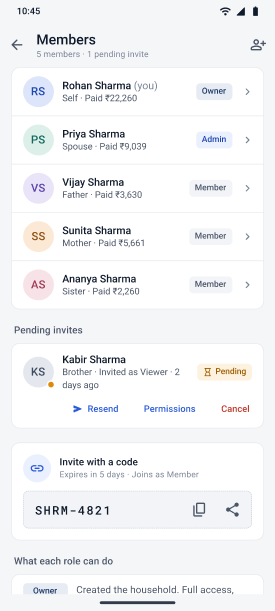
Members: five members with role chips and amounts paid, a pending invite with Resend, Permissions and Cancel, and an invite code
4
5
6
21Members
4Role chips and each person’s share paid.
5Pending invites with resend, permissions and cancel.
6Or join with a short code that expires.
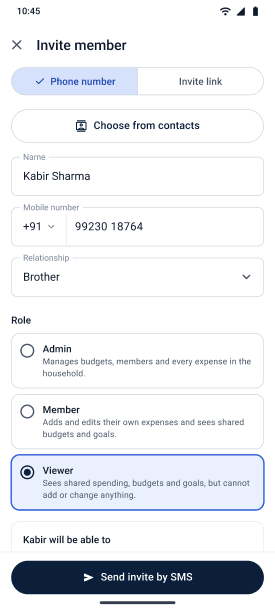
Invite member by phone number or link: choose from contacts, name, mobile number, relationship and a role, with Viewer selected, and Send invite by SMS
7
8
22Invite member
7Invite by phone number or share a link.
8Roles explained in plain words before you send.
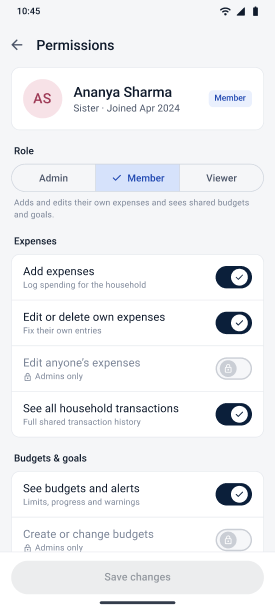
Permissions for Ananya Sharma, a Member: role tabs and switches for expenses and budgets, some locked to admins, and a disabled Save changes button
9
10
11
23Permissions
9Switch roles with one segmented control.
10Admin-only rights are locked and say why.
11Save stays disabled until something changes.
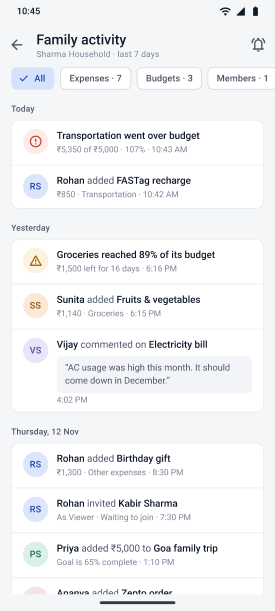
Family activity for the Sharma Household: filter chips with counts and a day-by-day feed of alerts, expenses, comments and invites
12
13
24Activity feed
12Filter the feed by expenses, budgets or members.
13Members can comment on a bill.
14 — SAVINGS GOALS

Goals the family saves for together, with a plan that does the maths.
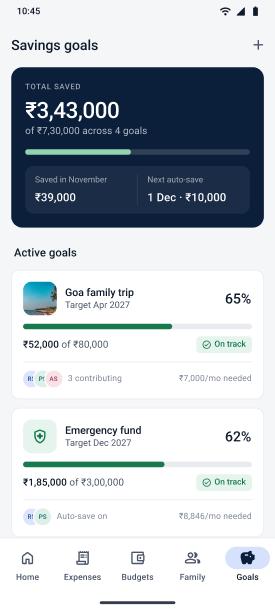
Savings goals: ₹3,43,000 saved of ₹7,30,000 across 4 goals, saved in November and next auto-save, with Goa family trip at 65% and Emergency fund at 62%
1
2
3
25Savings goals
1Total saved across goals, and when the next auto-save runs.
2Each goal shows progress, an on-track chip and the monthly amount needed.
3Who is contributing, at a glance.
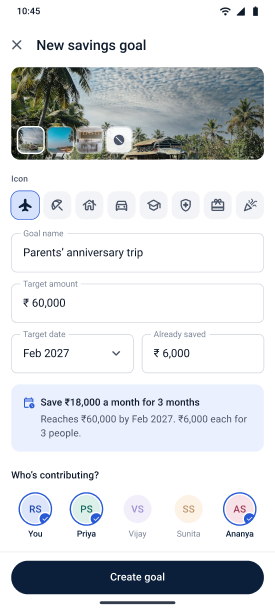
New savings goal: a cover photo, icon choice, goal name, target amount, target date, amount already saved, a monthly plan and who is contributing
4
5
6
26New savings goal
4Pick a cover photo and an icon for the goal.
5A live plan: how much a month, and each person’s share.
6Choose who chips in.
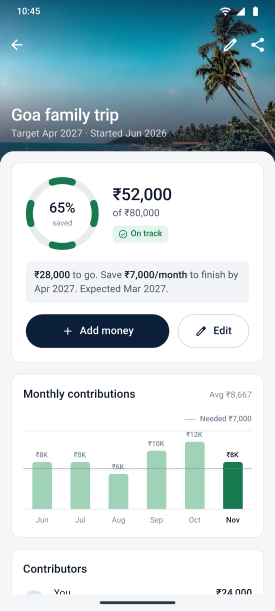
Goa family trip goal: 65% saved, ₹52,000 of ₹80,000, on track, with a plan to finish by April 2027, Add money, and a monthly contributions chart
7
8
27Goal progress
7Progress, an on-track chip and when it should finish.
8Monthly contributions against the amount needed.
15 — NOTIFICATIONS AND SETTINGS

Alerts that say what to do next, and privacy controls for a shared phone.
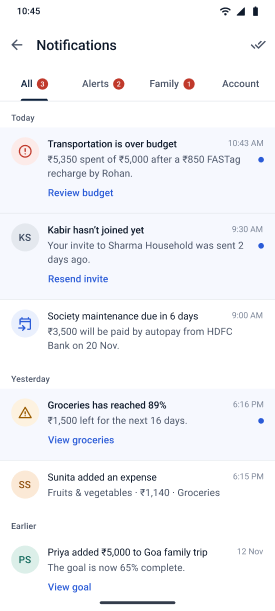
Notifications with All, Alerts, Family and Account tabs: an over-budget alert with Review budget, an invite reminder with Resend invite, an autopay reminder and family updates
1
2
28Notifications
1Tabs with unread counts: alerts, family, account.
2Each notification carries its next step, like Review budget.
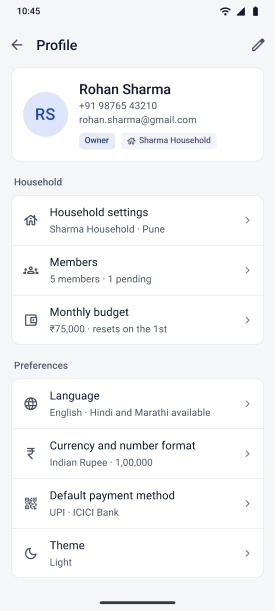
Profile for Rohan Sharma, owner of Sharma Household: household settings, members, monthly budget, language, currency and number format, default payment method and theme
3
4
5
29Profile
3Role and household shown with the profile.
4Language, and Indian number format: 1,00,000.
5UPI and a bank set as the default way to pay.
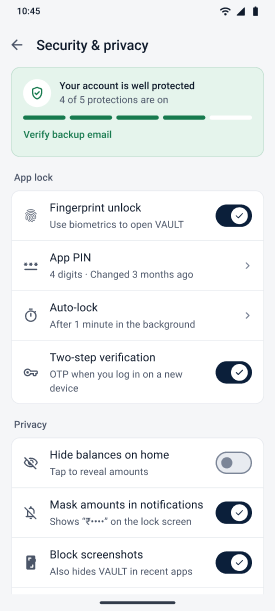
Security and privacy: 4 of 5 protections on with Verify backup email, app lock settings for fingerprint, PIN, auto-lock and two-step verification, and privacy switches
6
7
8
30Security and privacy
6A protection score with the one missing step.
7Fingerprint, PIN, auto-lock and two-step verification.
8Hide balances, mask amounts, block screenshots.
16 — THE NUMBERS ADD UP

Three views, one ₹42,850. A money app is only trusted if its totals tie out.

By categoryHome, Budgets, Breakdown · 06, 08, 16
Housing ₹15,000Groceries ₹12,500Other ₹6,000Transportation ₹5,350Utilities ₹4,000= ₹42,850
By who paidFamily, Members · 20, 21
Rohan ₹22,260Priya ₹9,039Sunita ₹5,661Vijay ₹3,630Ananya ₹2,260= ₹42,850
By weekMonthly overview · 07
1–7 Nov ₹33,8098–14 Nov ₹9,041= ₹42,850
Category limits
₹25,000 + ₹14,000 + ₹5,000 + ₹6,000 + ₹25,000
= ₹75,000 budget
Safe to spend daily
₹32,150 left ÷ 16 days
= ₹2,009 a day
Groceries allowance
₹1,500 left ÷ 16 days
= ₹94 a day
Budget alert fix
₹1,500 moved − ₹350 over
= ₹1,150 left
Goa trip plan
₹28,000 to go ÷ 4 months
= ₹7,000 a month
New goal plan
(₹60,000 − ₹6,000) ÷ 3 months ÷ 3 people
= ₹6,000 each

The sample data stays consistent across all 30 frames, down to dates: Saturday 14 November 2026, with 16 days left in the month. The exceptions are the ring and donut charts and the household names, covered next.

17 — WHAT I’D IMPROVE NEXT

A first version is a hypothesis. Here’s what I’d change and test next.

01
Draw the ring and donut charts to scale.

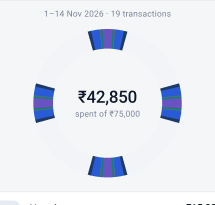
In the exported frames, the 57% ring and the spending donut both show four equal dashes, so neither shows the real share. Each arc should be drawn from its value.
BEFORE · AS EXPORTED
Exported donut chart showing four identical segment blocks instead of category shares Exported 57% ring showing four equal dashes
AFTER · DRAWN TO SCALE
₹42,850spent of ₹75,00057%
02
One household, one story

Sign-up and Profile say Rohan Sharma of Pune. Household setup, Home and Recent transactions say Krithik, RKKR Household, Erode. Pick one family for every frame.

03
Lift helper-text contrast

Ink 3 (#7B8597) is 3.7:1 on white. Use Ink 2 (#4B5568, 7.5:1) for helper text, captions and timestamps.

04
Start opt-ins unticked

The WhatsApp alerts box is ticked on sign-up. India’s DPDP Act asks for consent by a clear affirmative action, so let people tick it.

05
Keep the FAB clear

On Home, Add expense covers the Transportation amount. Pad the bottom of lists, or shrink the button on scroll.

06
Say “over”, not “ahead”

“₹7,850 ahead of the ideal pace” can read as good news. Try “₹7,850 over the ideal pace so far”.

07
Plan for more languages

Language offers English, Hindi and Marathi. A family in Erode would want Tamil, so plan layouts for longer labels.

08
Tidy the presentation file

The Home sheet is missing its “02 —” label, and category swatch hex codes are cut off (#1D3A6…).

09
Test with real families

A two-week diary study with three or four households: who logs, how often, and whether alerts lead to fixes.

Thank you.
Designed by Krithik Ram R K · UI/UX Designer
[Portfolio link] [LinkedIn] [Email]