Portfolio
Water Tracker 4MEHydration, one glass at a time

Pinch to zoom into any board for detail.

UI/UX Case Study

Water
Tracker 4ME

Stay hydrated, one tap at a time.

A hydration app with smart reminders, quick glass-by-glass logging and a daily dashboard that shows how close you are to your goal.

Mobile app UI/UX design Health Figma
Designed by Krithik Ram R K
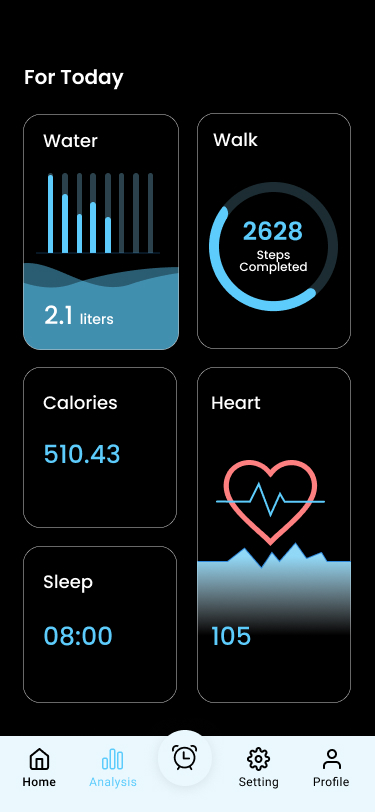
For Today dashboard with water, walk, calories, heart and sleep cards
Drink Water Glass screen at 100% with Goal Achieved
Home screen with the next reminder, a water progress ring, last drink and daily target
01 — OVERVIEW

Drinking enough water is simple. Remembering to is the hard part.

Water Tracker 4ME helps people build a steady hydration habit. It asks for a few personal details, sets a daily goal, reminds you between your wake-up and sleep times, and lets you log each glass with a tap.

I designed the full experience: onboarding and sign-up, a home screen built around one progress ring, a daily health dashboard, goal setting, end-of-day feedback, settings and history.

ROLEUI/UX Designer
PLATFORMMobile app · 375 × 812
TOOLSFigma
TIMELINE[Add timeline]
DELIVERABLESPersona, journey, 20 screens
A goal that fits you

Age, weight, height and daily rhythm feed the goal, or pick a ready-made template.

Smart reminders

Nudges between your wake-up and sleep times, with sound and mode settings.

Glass-by-glass logging

Every glass fills the progress ring and the goal preview, one tap at a time.

Progress you can see

A daily dashboard, end-of-day feedback and a weekly completion strip.

02 — THE PROBLEM

Most people know they should drink more water. Busy days make them forget.

29.5%

of US adults were inadequately hydrated in a Harvard study of national health survey data from 2009–2012.

32%

of 2,000 UK adults said they simply forget to drink water, in a 2024 survey commissioned by a hydration brand.

~1.5%

loss of body water was enough to bring on headaches, fatigue and poorer concentration in young women, in a 2012 study.

Thirst arrives late. The lead researcher behind that study notes it doesn’t really appear until we’re 1 or 2 percent dehydrated.

A reminder that respects your day, and a log that takes one tap, can close that gap.

HOW MIGHT WE

Help busy people drink enough water through the day, without nagging or fiddly tracking?

Sources: Harvard T.H. Chan School of Public Health study, American Journal of Public Health (2017); Liquid I.V. survey of 2,000 UK adults (2024), via the Yorkshire Post; Armstrong et al., Journal of Nutrition (2012), via UConn and EurekAlert.

03 — USER PERSONA

Meet Kavya: she means to drink more, then the day takes over.

Proto-persona · validate with interviews
KM
Kavya Menon
The busy forgetter
AGE27
LIVES INChennai
WORKSoftware tester, desk job
DRINKSAbout 4 glasses on a workday
PHONEAlways within reach

“I don’t need a lecture. Just nudge me, let me tap once, and show me I’m getting there.”

Kavya spends most of her day at a desk in an air-conditioned office. She keeps a bottle nearby but forgets it during long testing sessions, and notices the afternoon headache before she notices she’s thirsty. She’s tried tracking apps before and gave up when logging felt like work.

GOALS
Drink enough without having to think about it
Get reminders that fit her working hours
Log a glass in a single tap
See progress that keeps her going
FRUSTRATIONS
Forgets to drink until the headache hits
Reminders in meetings or late at night
Apps that ask too much before she can start
Numbers that don’t add up, so she stops trusting them
HABITS
Checks her phone between test runs
Uses dark mode all day
Loves a small streak or badge
PERSONALITY
Comfort with appsHigh
Health motivationMedium
Patience with setupLow
04 — USER JOURNEY

Kavya’s first week, from download to a full strip of ticks.

01Set up
02Morning
03Workday
04Evening
05Week review
DOING
Downloads the app and enters age, weight, height and sleep times.
Opens Home to see today’s goal and the next reminder.
Gets a nudge between test runs and logs a glass.
Checks the goal preview before bed.
Looks at the weekly strip on Sunday.
THINKING
“Is this going to take long?”
“How much should I drink today?”
“Oh right, water.”
“Did I make it today?”
“Am I actually getting better?”
FEELING
Hopeful
Motivated
Distracted
Let down if short
Encouraged
PAIN POINT
A long sign-up before any value.
No idea what her right amount is.
Reminders at bad moments get ignored.
A missed goal can feel like failing.
Stats that don’t match what she did.
HOW IT HELPS
Details asked once, with quick sliders.
A goal in glasses, or a ready-made template.
Reminders between wake-up and sleep times.
Clear end-of-day feedback, either way.
A weekly completion strip and averages.
05 — USER FLOW
From first launch to the first glass logged.
Sign-up runs left to right, then back to Home, where five features branch out.
Splash
Onboarding · 3 slides
Your details
Create account
Verify email code
You are verified
Log in
Home
Today dashboard
Set your goal
Reminders
Settings and history
Edit profile
Log glasses through the day
Goal achieved
Congratulations!
Goal missed
Oops!
The tab bar (Home, Analysis, Reminders, Setting, Profile) keeps every main feature one tap away.
06 — VISUAL LANGUAGE

Water is the only bright thing on screen, so progress always stands out.

BRAND
Water Tracker 4ME
Stay hydrated and track your daily water intake

A white drop holding a bottle, on the same aqua that later fills every progress ring.

COLOUR
Aqua
#5DCBFC
Buttons, progress, splash
Mist
#CEEFFE
Illustrations, light panels
Black
#000000
Screen background
White
#FFFFFF
Cards, fields, text
Leaf
#55A55E
Goal achieved
Alert
#FE0000
Shortfall figures
TYPE
Aa
Poppins
Round, friendly, easy at a glance
860 · Bold goal number
Onboarding title24 · SemiBold
Screen title20 · SemiBold
Card title16 · Medium
Body and helper text14 · Regular
Caption and units12 · Regular
Approximate sizes, measured from the 375 × 812 frames.
COMPONENTS
Primary button, shown with a dark label for contrast
Input field
Code entry
1 9 2 3
Goal template card
Summer time
10 Glass
Weekly completion
Mon Tue Wed Thu Fri
07 — FIRST LAUNCH

Three slides, three promises, then straight into setup.
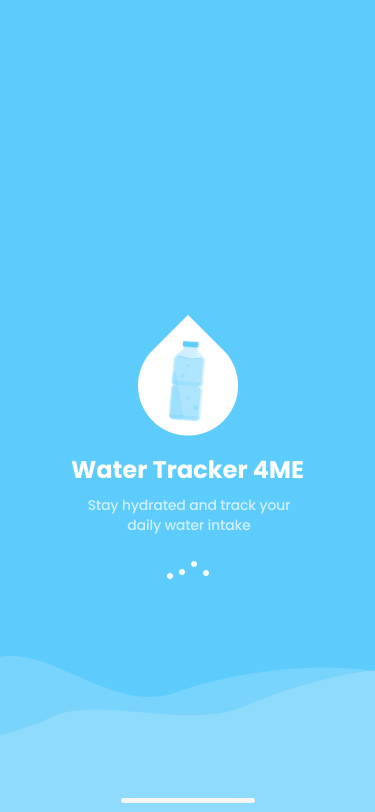
Aqua splash screen with the drop logo, app name and a loading indicator
Splash

Aqua fills the screen, with the drop logo and a loader over soft waves.
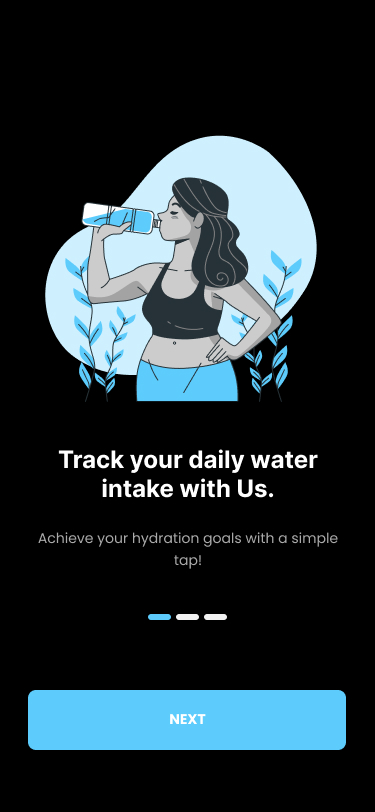
Onboarding slide: Track your daily water intake, with a woman drinking from a bottle
Track your intake

Each slide pairs one promise with a friendly aqua illustration on black.
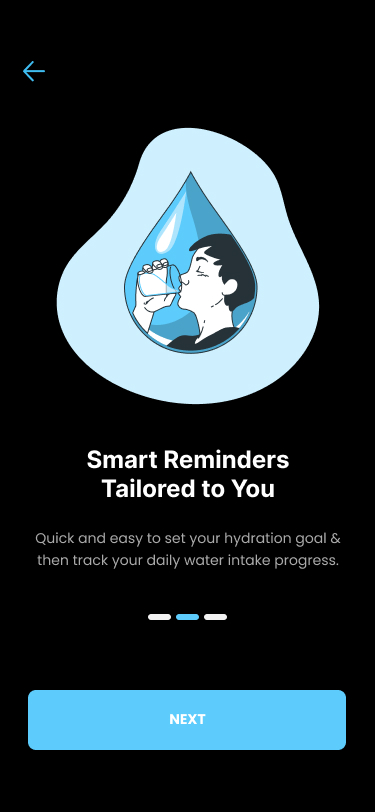
Onboarding slide: Smart Reminders Tailored to You, with a figure inside a water drop
Smart reminders

The middle slide sells the feature busy people need most.
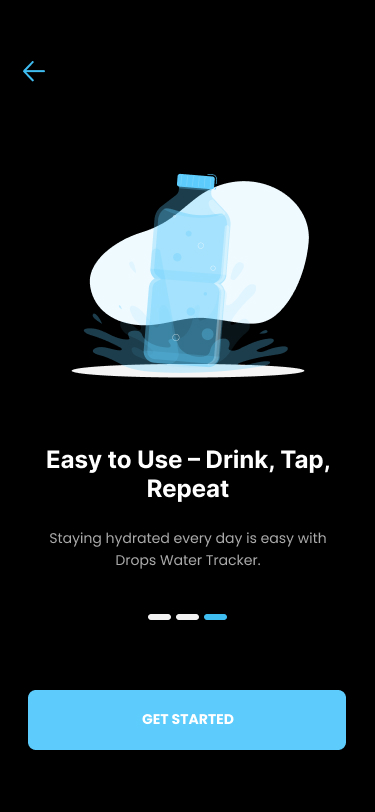
Onboarding slide: Easy to Use, Drink, Tap, Repeat, with a water bottle splash and a Get Started button
Drink, tap, repeat

The last slide swaps Next for Get Started, signalling that setup begins.

08 — PERSONALISE AND SIGN UP

Your details come first, so reminders can fit around your day.
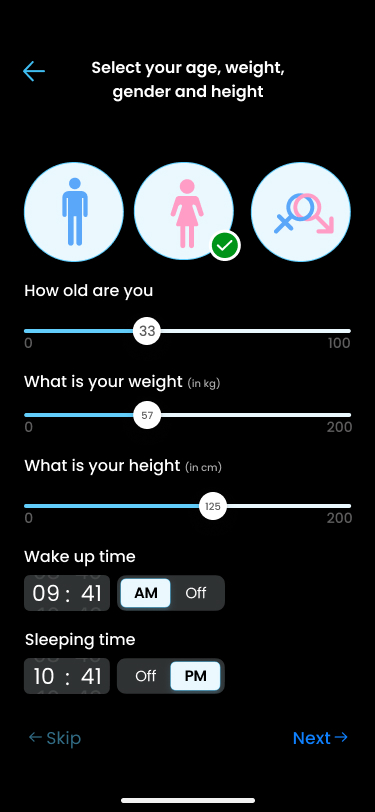
Details screen with gender icons, age, weight and height sliders, and wake-up and sleeping time pickers
Your details

Gender, age, weight and height on sliders, plus wake-up and sleep times for reminders.
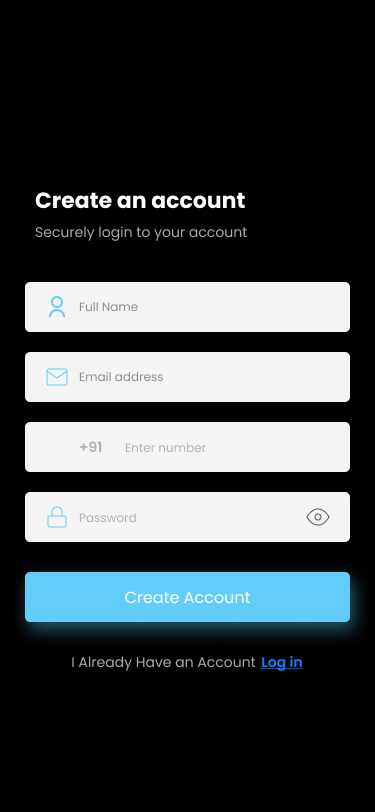
Create an account screen with name, email, phone and password fields
Create account

Name, email, phone with a +91 prefix, and password on one screen.
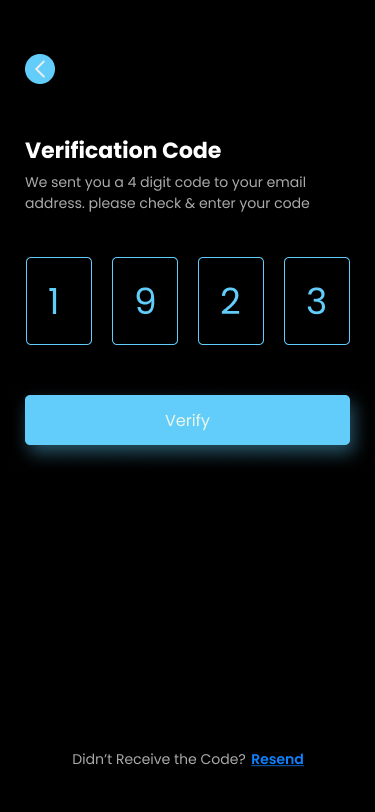
Verification code screen with four boxes filled in and a Verify button
Verify email

Four large code boxes, with Resend tucked at the bottom.
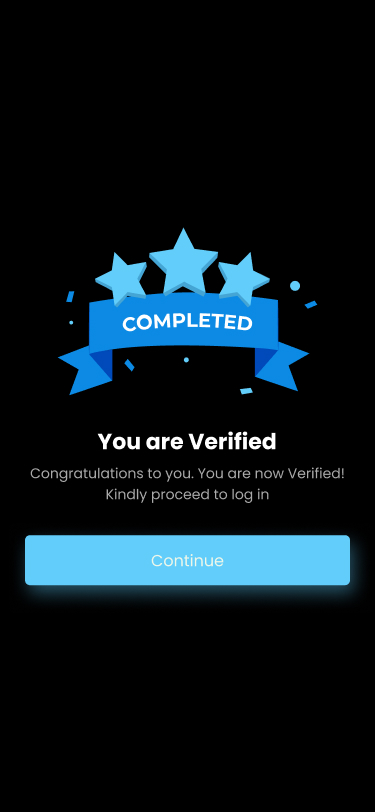
You are Verified screen with a Completed ribbon and three stars
You’re verified

A celebratory badge confirms the account before log in.
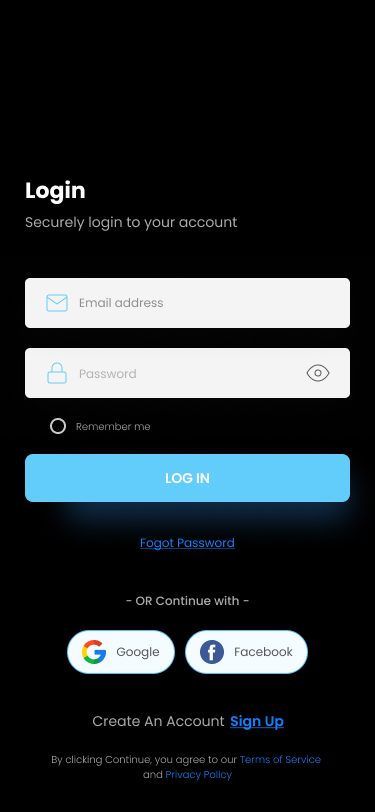
Login screen with email and password, Remember me, and Google and Facebook buttons
Log in

Email and password, Remember me, or one tap with Google or Facebook.

09 — HOME AND GOAL

One ring to watch, one dashboard for the rest, and a goal you set in glasses.
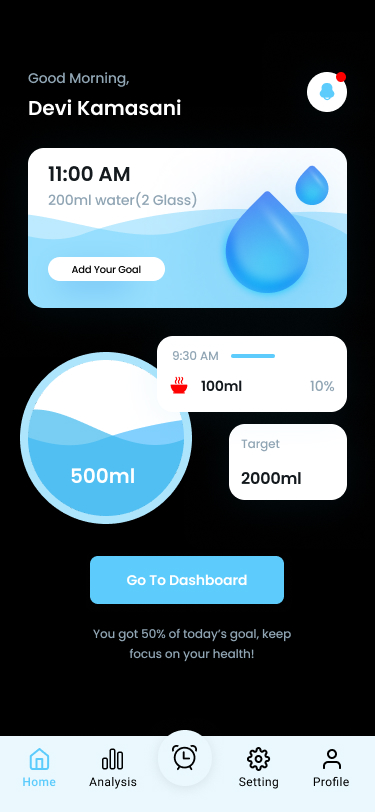
Home screen: next reminder card, water progress ring at 500 ml, last drink, daily target and Go To Dashboard
1
2
3
4
5
Home
1The next reminder leads: time, amount and a shortcut to set a goal.
2A wave fills the ring as you drink, so progress reads at a glance.
3Last drink and daily target sit right beside the ring.
4One button opens the full health dashboard.
5A raised alarm button keeps reminders a tap away on every tab.
For Today dashboard with water 2.1 litres, walk 2628 steps, calories, heart rate and sleep
6
7
For Today
6Water comes first, next to steps, calories, sleep and heart rate, so hydration is part of the whole day.
7Each card has its own chart: bars, a ring, a pulse line.
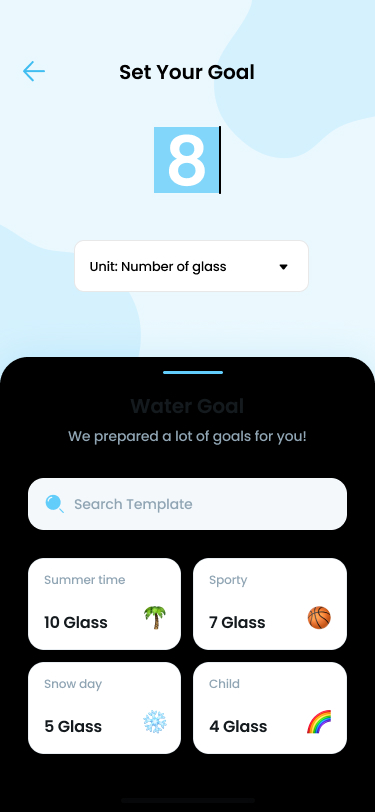
Set Your Goal screen with 8 glasses, a unit picker and goal templates
8
9
Set your goal
8Type a number of glasses, with the unit one tap away.
9Or pick a template: summer, sporty, snow day or child.
10 — GOAL FEEDBACK

Every glass moves the ring. Every evening ends with an honest answer.
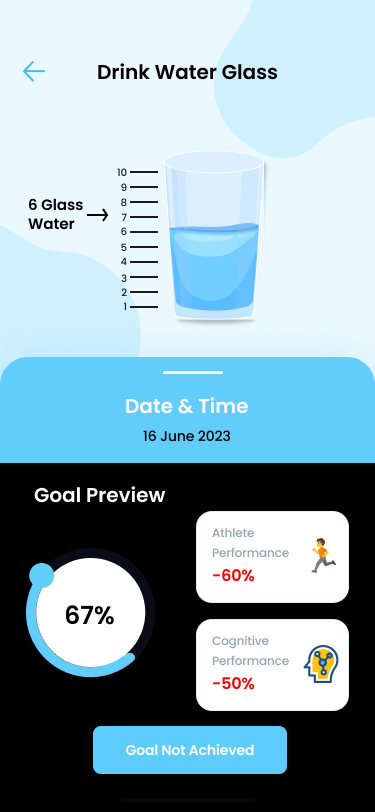
DURING THE DAY · GOAL PREVIEW
Drink Water Glass at 6 glasses with a 67% ring and a Goal Not Achieved button
Not there yet

Six glasses fill the measuring glass, with a 67% ring and Goal Not Achieved.
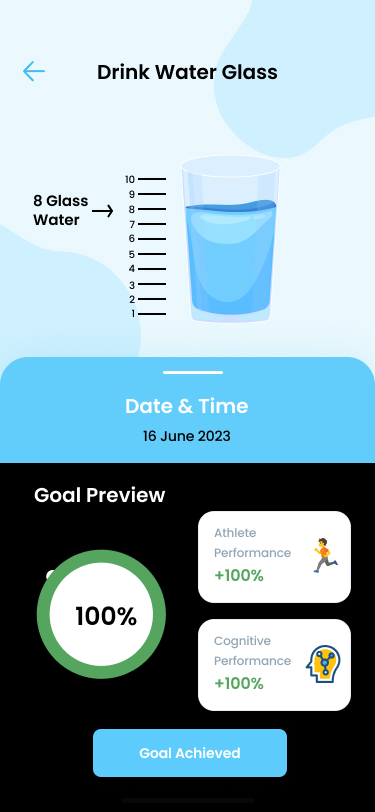
Drink Water Glass at 8 glasses with a green 100% ring and a Goal Achieved button
Goal reached

At eight glasses the ring turns green and the button reads Goal Achieved.
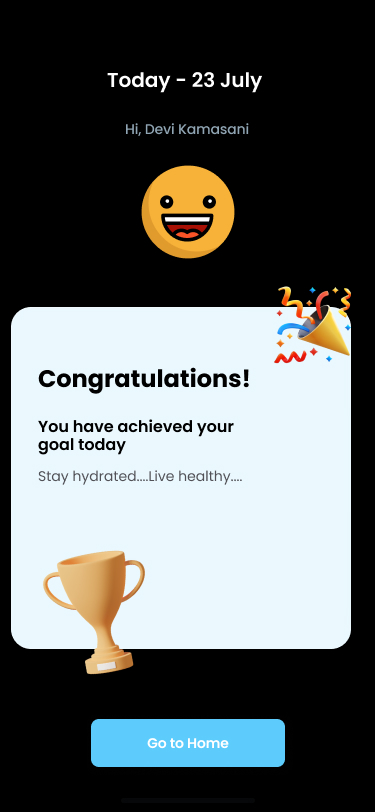
END OF DAY · RESULT
Congratulations screen with a smiling face, a trophy and confetti
Congratulations!

A big smile and a trophy when the day’s goal is met.
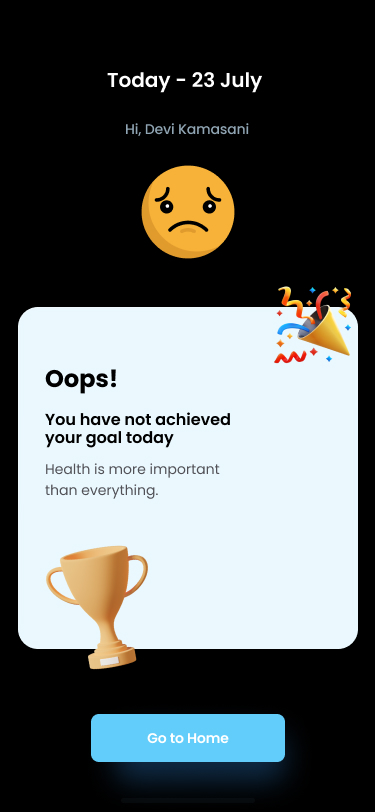
Oops screen with a sad face, a trophy and a note that health is more important than everything
Oops!

A sad face and a gentle nudge when it isn’t, with one way back home.

11 — PROFILE, SETTINGS, HISTORY

The quieter screens that keep the habit going.
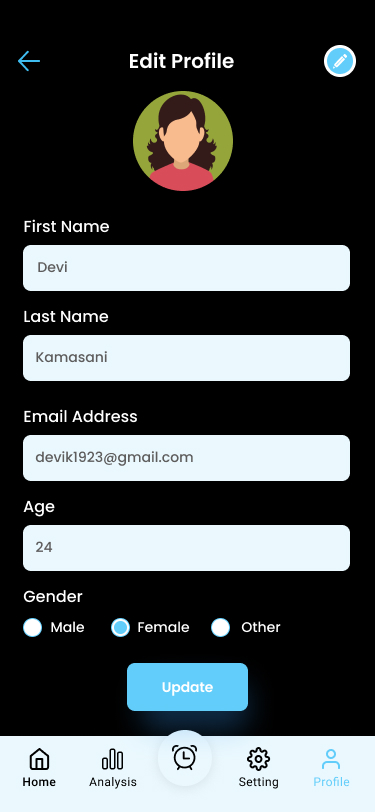
Edit Profile screen with avatar, name, email, age and gender fields and an Update button
10
11
Edit profile
10Profile details stay editable, with one clear Update button.
11Gender offers Male, Female and Other.
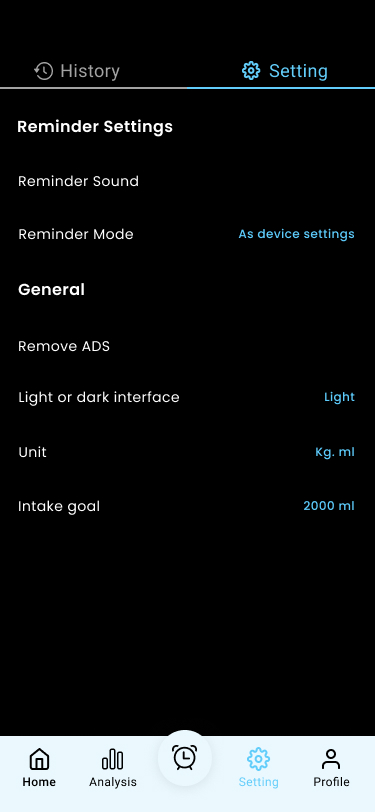
Settings tab with reminder sound and mode, remove ads, interface, unit and intake goal
12
13
Settings
12Reminder settings come first, because reminders are the core of the app.
13Unit, interface and daily intake goal can change any time.
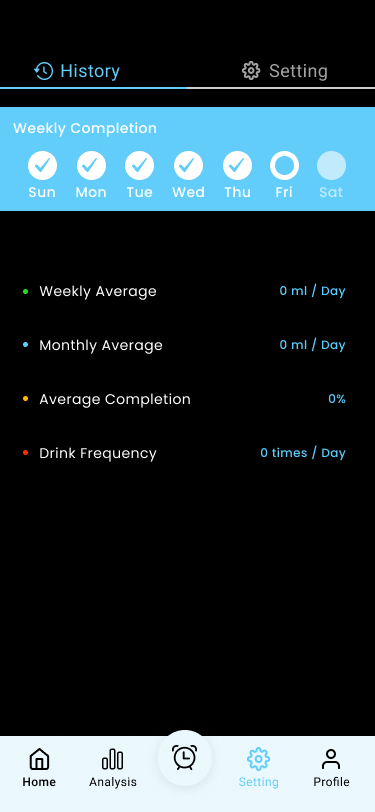
History tab with a weekly completion strip and weekly, monthly and completion averages
14
15
History
14A weekly strip ticks off each day the goal was met.
15Averages and drink frequency add up the habit over time.
12 — WHAT I’D IMPROVE NEXT

A first version is a hypothesis. Here’s what I’d change and test next.

01
Make every number add up.

500 of 2,000 ml is 25%, not 50%. Six of eight glasses is 75%, not 67%. And the dashboard shows 2.1 litres while Home shows 500 ml. One source of truth keeps people like Kavya trusting the app.

BEFORE · HOME

500 ml of 2,000 ml · “You got 50% of today’s goal”

AFTER

500 ml of 2,000 ml · “You’re a quarter of the way there”

02
Dark text on aqua buttons

White on #5DCBFC is about 1.9:1. A dark ink label reaches about 10:1 and passes WCAG AA.

03
Back health claims, or drop them

“Athlete performance −60%” has no source. Use sourced, gentler lines, such as mild dehydration bringing on headaches.

04
Fix copy and state slips

Onboarding names “Drops Water Tracker”, sign-up says “Securely login”, Login reads “Fogot Password”, and Settings says Light on a dark app.

05
Keep the missed-goal screen calm

Oops still shows party confetti and a trophy. Swap them for a calmer visual and one small tip for tomorrow.

06
Let reminders respect the day

Pause during Do Not Disturb or meetings, and let people log or snooze straight from the notification.

07
Test it with desk workers

Measure how often reminders lead to a logged glass, and who is still using the app after a week.

Thank you.
Designed by Krithik Ram R K · UI/UX Designer
[Portfolio link] [LinkedIn] [Email]